The five GA4 events you actually need

The tag is on the site, the dashboards load, and you know how many people visited last month. Then someone asks how many enquiries the site produced and from which channel — and the answer is not in the report. GA4 is not the problem. A default install simply knows nothing about your business: it counts page views, while what you care about is enquiries, calls and quote requests.
What a default GA4 install measures, and what it does not
The moment the tag lands, GA4 starts collecting on its own. Automatically: page_view, session_start, first_visit, user_engagement. With enhanced measurement on you also get
Read that list again. Every one is about behaviour — who arrived, how far they scrolled, which file they downloaded. None is about a decision. "How many real enquiries came in this month, and from where?" is answered nowhere in it.
form_submit comes closest, and that is exactly where the trap sits. It fires the moment the form is submitted. It does not know whether your backend accepted it, whether validation passed, or whether the notification email ever left the building. Even the closest candidate can quietly report a number that is too high.
An event and a key event are not the same thing
In GA4 everything measurable is an event. A key event is one you flagged as mattering to the business — and any event can be flagged. The distinction is practical: an event is something that happened; a key event is something you wanted to happen.
The common mistake is marking everything as key. The word then stops meaning anything: fourteen rows in the report and still no priority. Three or four is enough for most businesses.
There is a technical trap too. If an event name runs longer than 40 characters, GA4 will not report it as a key event, because the _c suffix it appends internally no longer fits (collection limits). The urge to write long, self-documenting names gets expensive right here.
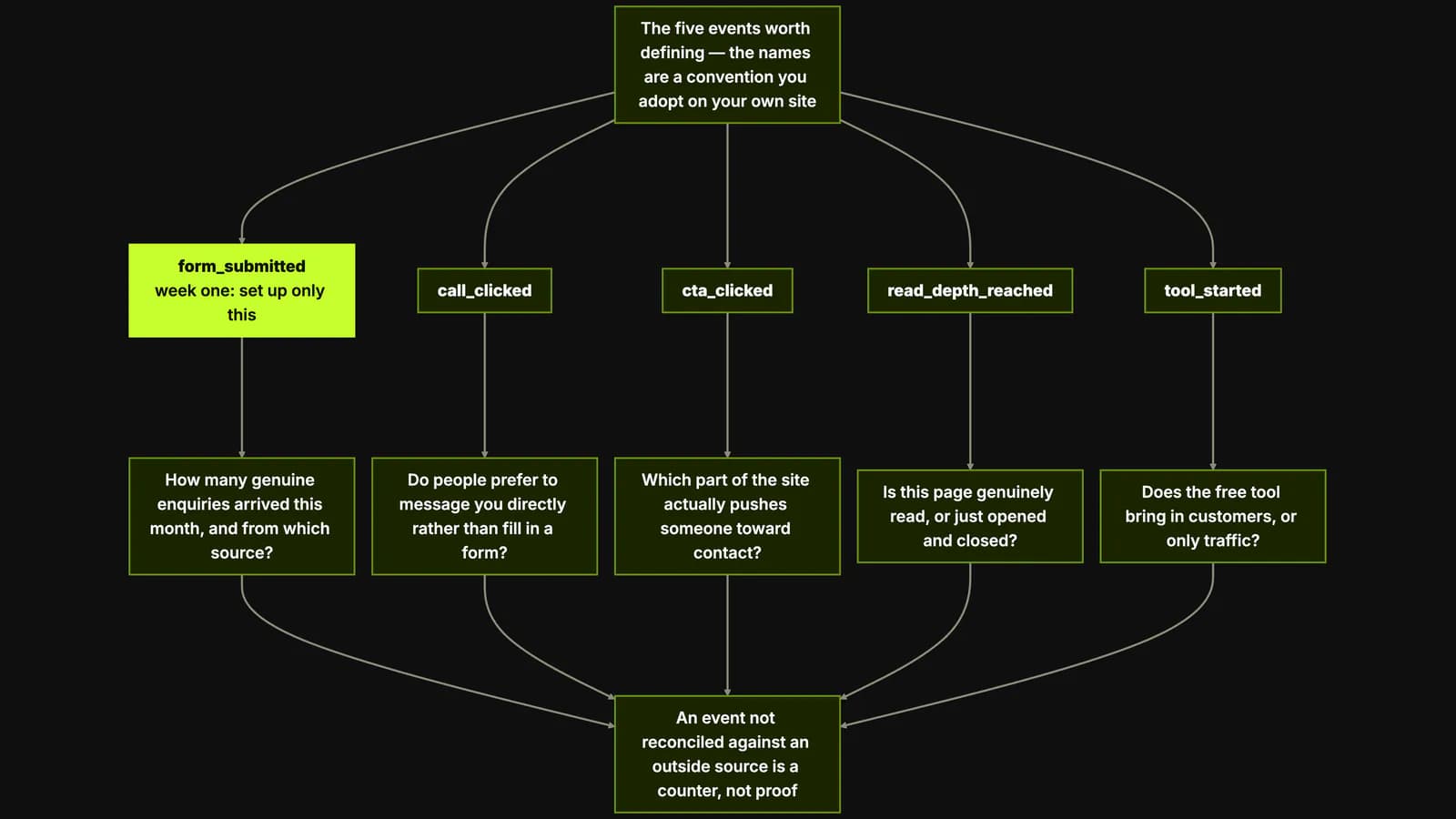
The five events worth defining
1. Form submitted — confirmed, not attempted
Answers: how many genuine enquiries arrived this month, and from which source?
This is the one everything else hangs off. Fire it on the server's success response, not on the button click — after the record has actually reached your database or inbox. Attach two or three parameters: the page the form sat on, the type of request (service, pricing, support), and the budget band if you collect one. Without them, "40 enquiries" tells you nothing — you cannot tell 40 real briefs from 40 spam submissions.
2. Phone and WhatsApp clicks
Answers: do people prefer to message you directly rather than fill in a form?
On mobile the answer is usually yes, and here the default install leaves you blind. Enhanced measurement's click event only captures links that lead away to another website — a tel: link leads nowhere external, so it is never counted. A wa.me link is captured, but lands in the same bucket as every other outbound click.
The fix is small: define one event for tel:, wa.me and mailto: links, and put the channel in a parameter — method: phone | whatsapp | email. One event, one parameter, three channels answered at once.
3. The primary CTA click
Answers: which part of the site actually pushes someone toward contact?
An enquiry is won long before the form. Measure the click on your primary button — "Start a project", "Get pricing" — as its own event, and record which block it came from in a parameter: hero, pricing block, end of article, mobile sticky bar.
After a few weeks the picture is often not what anyone expected: most enquiries arrive not from the large button on the home page but from a quiet link halfway down a service page. That turns a redesign argument about taste into one about numbers. Conversion rate optimization starts from exactly this kind of number.
4. Meaningful engagement
Answers: is this page genuinely read, or just opened and closed?
GA4's own definition sets a very low bar. A session counts as engaged if it lasts longer than 10 seconds, or contains a key event, or includes two or more page views. Ten seconds is not reading time.
Set your own threshold instead: reaching the pricing block on a long service page, passing the second subheading in an article, 60 active seconds on a documentation page. Choosing the threshold is itself a decision — and it is what makes content work measurable. The scroll event is no substitute: on a phone, 90 % depth is sometimes one flick of a thumb.
5. Tool and interactive use
Answers: does the free tool bring in customers, or only traffic?
Anything interactive needs a short chain rather than a single event: start, result, next step. On our own site that chain is tool_started, tool_result_viewed, email_gate_submitted, intake_submitted. The tool in question is our free SEO/CWV site audit.
Look at the names. Not one contains the word "click". Each names a decision the visitor made: started the tool, saw the result, handed over an email address, sent a project enquiry. That is why those four numbers read like a sentence — how many runs, how many reached a result, how many turned into an enquiry. Named after buttons (button_1, submit_click), the same data would be collected and nobody could draw a conclusion from it.
Names and parameters matter more than volume
Adding more events is easy and useless. Concentrate on three things.
- Name after the decision, not the button.
quote_requestedstill makes sense six months later;click_btn_bluedid not on the day it shipped. - Write the naming convention down. Lower case, underscores, an object_verb shape:
form_submitted,
Three well-named events support more decisions than twenty accidental ones.
How to prove an event really fires
Seeing an event once in DebugView is not proof. It proves one thing: the tag works in your browser, with your consent choice, on a device with no ad blocker. The real check starts after that.
- Reconcile against an outside source. The strongest test available: compare the form submissions GA4 reports for a given day against the real count of records in your inbox, CRM or database. If they disagree, one of them is lying — and until you know which, do not show that report to anyone.
- Write to a second place. We record the same funnel events, whatever analytics tool is running, into our own
eventstable. That is not paranoia, it is two independent counters. The moment they drift apart, there is a reason to go looking. - Test in real conditions. Not on your desktop: on an actual phone, on mobile data, with consent declined in the banner, and once more with an ad blocker enabled. Each scenario loses some events, and it is worth knowing which.
Where to start
Do not ship all five at once. In week one set up only the confirmed form submission, mark it as a key event, and reconcile it against an outside source. When the number agrees, move to the second.
Five events is not a lot. But five correctly named and verified ones give you what the hundreds of rows from a default install never will: knowing which channel, which page and which piece of copy bring in real customers. If you want it set up with you, that is our digital analytics and GA4 setup work.